Tidal Connect Desktop App

l4sty

Active member
Ciao a tutti, sto cercando uno streamer per servizi digitali (Tidal) + DAC da aggiungere alla mia catena.

Vorrei una soluzione nativamente gestibile tramite app Desktop. Nel caso Tidal ho visto che è sufficiente avere Tidal connect nello streamer per poter gestire da App Android. Teoricamente la stessa cosa è possibile farla anche tramite App Desktop (Windows) di Tidal ma in realtà non trovo esperienze (anzi, trovo utenti come me che chiedono info).

Qualcuno ha avuto esperienze dirette?

L'alternativa più "sicursa" sarebbe andare su soluzioni proprietarie come Bluesound che offre il suo BluOs Controller per Windows o l'app di Wiim Amp Ultra per Desktop ma è in versione "beta" da sempre.

Grazie
 
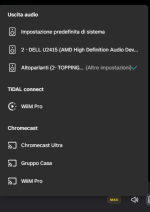
Per Tidal uso, lato impianto in sala, Wiim Pro (con dac esterno), mai usato con l'app Tidal per smartphone, quella del PC in studio lo vede pertanto penso sia lo stesso anche per i device mobili o i tablet.
Però preferisco l'app WiiM, se poi voglio ascoltare altro non devo chiudere un'app e aprirne un'altra ;)
 
quale catena in specifico?
YAMAHA RX-A3060 puoi usare Tidal con app Mconnect
Musical Fidelity M3si puoi usare la nvidia Shiled che supporta i DAC USB
 
Grazie per i suggerimenti. Vi riporto la risposta ufficiale da Tidal:

Thank you for reaching out to TIDAL Support.

We’re happy to clarify how lossless playback works with Bluesound Node devices and the TIDAL desktop app.

The TIDAL Windows desktop app does not support direct casting in lossless quality to external devices. However, your Bluesound Node N132 supports TIDAL Connect, which allows the device to stream music directly from TIDAL’s servers in lossless quality, including FLAC and MQA formats (depending on your subscription tier and the content).
Here’s how it works:

  • When using TIDAL Connect, your Node device handles the stream independently, ensuring full-resolution playback.
  • This applies whether you initiate playback from the TIDAL mobile app, desktop app, or the BluOS Controller app — as long as TIDAL Connect is used, the stream remains lossless.
Regarding older models:
  • Node 2, Node 2i, and Node N130 also support TIDAL Connect and can stream in lossless quality.
  • All models must be running the latest BluOS firmware to ensure compatibility and optimal performance.
If you’re using the BluOS Controller app on PC to control playback, rest assured that the stream is still handled by the Node device itself, not your computer. This means the audio remains lossless, as the app functions as a remote control rather than a playback source.

We hope this clears up the confusion. If you have any further questions or need help confirming your setup, feel free to reach out.

Kind regards,
Steven
TIDAL Support
 
Top