ok, quindi meglio iniziare dal rosso che è quello più sbagliato, e poi vedere...
immagino che se inizio a toccare il rosso anche gli altri colori subiranno qualcosa
E' normale che se regoli (ad esempio!) il rosso al 50% di saturazione (usando apposito pattern), facendo poi la lettura di tutte le saturazioni del rosso, troverai scostamenti al 25-75-100%.
Il punto è capire cosa ti interessa calibrare, a che valore di saturazione centrare il target.
Nella guida è spiegato chiaramente cosa è meglio, però potrebbe anche essere una scelta soggettiva.
Per calibrare correttamente il CMS ci sono apposite indicazioni fornite da HCFR, ovvero grafici, istogrammi e altro.
In un recente post (
LINK) ti avevo scritto che, dal momento che hai un Panasonic con CMS RGB, ti conviene spuntare la voce "use HSV level bar" nella schermata sottostante.
Infatti nelle ultime versioni di HCFR attivandola appaiono 4 barre le prime 3 rappresentano in ordine HSV (Hue, Saturation, Value luminance level) e la 4a barra il dE, quindi hai una esposizione più completa non solo luminanza come prima ma anche Tinta, Saturazione e dE.
"The added option is under user measures (same place as "detect primary colors...") as a checkbox for "Use HSV Level Bars". If left unchecked RGB coordinates will be used. These coordinate indicators should provide better correlation with HSV(L) CMS display controls for real-time adjustments. I've set the "V" to be identical to Luminance level, H is hue angle with values > 100% a rotation counter clockwise from target. S is a measure of the distance to the white point.
The RGB bars should also be more usable for RGB based CMS systems as they have been changed to actual coordinate differences instead of white balance values. Normal white balance indicators are maintained when you are measuring a gray/white patches.
Also put in a 4th bar with dE level. [Note: dE updating in continuous mode for the gray scale is not working yet]"




 Ho iniziato la calibrazione del mio ZT60 arrivando fino allla curva rgb. Utilizzo HCFR, una i1D pro e la guida quipresente. Come suggeritomi dai vari forum ho fatto la 2-punti calibrando solo i gain con pattern gcd 80% e non ho toccato i cut. Dopo avere aggiustato poco (gain b: -3) sono passato alla 10 punti fino ad arrivare ad una curva rgb piatta con errori <1. Il tutto regolando solo rosso e blu, e non toccando il verde (che si è appiattito da solo con la regolazione delle altre 2 curve). La visione è migliorata enormemente, non ho più nessuna dominante ne alle alte ne alle basse luci.


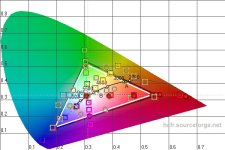


 .
.