Dischi pattern utili per calibrare

  • Autore discussione Autore discussione biasi
  • Data d'inizio Data d'inizio
..........[CUT] questa feature sarebbe utile solo per una autocal che in ogni caso non è poco
Appunto!
Pensa a tutti quelli che non hanno un processore video compatibile con l'autocal, e al relativo risparmio economico se quella fosse la ragione principale dell'eventuale acquisto...
Ettore
 
@f_carone in prima pagina nello stesso post ho inserito il link della versione con le domande

@John B io usando il programma Calman e Lightspace mi trovo benissimo con il disco Ted's LightSpace CMS Calibration Disk che lo considero per ora il più completo;inoltre uso anche Spears & Munsil che ha dei pattern molto utili come ad esempio quello per capire come impostare l'uscita video tra rgb,ycbcr 4:2:2 e 4:4:4
prima di usare questo disco di calibrazione usavo AVS HD 709 - Blu-ray & MP4 Calibration e GCD - Gamut Calibration Disk
 
in alcuni computer per funzionare lo script bat può richiedere i permessi di amministratore;se eseguito come amministratore però ci sono alcuni problemi,con l'attuale versione,nel trovare i comandi da eseguire per le letture

ho pubblicato la versione rimuovendo il bug e ora può essere eseguito anche come amministratore
ho inoltre pubblicato una nuova versione qui: http://www.avmagazine.it/forum/88-c...ern-utili-per-calibrare?p=4194818#post4194818
 
Ultima modifica:
Ottimo Riccardo .
Un dubbio, indipendentemente dall'uso del tuo script, se si vuole escludere la misura del black nel color checker è sufficiente deflaggare l'opzione black del color checker settings lasciando use measured black level nel black level target options? Quest'ultima opzione ha influenza se si esegue solo la lettura del color checker?

Grazie
Filippo

PS i link ai 2 script sono uguali.
 
Ultima modifica:
grazie per la segnalazione, ho provveduto a correggere il link

se si vuole escludere la misura del black level nel color checker basta deflaggare quell'opzione ma se si usa l'ultimo programma occorre lasciarlo su on: ci penserà il programma a saltare tale pattern durante la misura (se si esegue quello con "without_black")
L'opzione "use measured black level" (lasciata a default o impostando un valore a mano) influenza il calcolo dei delta E su tutti i workflow che visualizzano e misurano il black level solo se si setta l'opzione "Include Black in AVG/Max dE" in "Application Measurement Optins" ;inoltre il valore inserito manualmente nel measured black level (o quello rilevato) verrà anche usato per il calcolo del target gamma con la black compensation
per chi usa un radiance con autocal (che prende la misura anche del nero) è consigliabile far misurare il nero invece che settarlo manualmente perchè altrimenti la procedura andrà a modificare il livello 0 sul radiance creando a volte dei problemi
 
Ultima modifica:
..........[CUT] per chi usa un radiance con autocal (che prende la misura anche del nero) è consigliabile far misurare il nero invece che settarlo manualmente perchè altrimenti la procedura andrà a modificare il livello 0 sul radiance
Scusa Riccardo, ma qui stai parlando di un'opzione in Calman, Radiance o cosa...?
Nel caso dei primi due, di quale opzione/menu si tratta...?
Ettore
 
Riccardo sta approntando una comoda utility che consente di usare Calman + il proprio lettore come sorgente, utilizzando i pattern del disco Ted's, sincronizzando i tempi di lettura di Calman con lo scorrimento dei pattern.
Per facilitare questo procedimento, consiglia di non far leggere il Nero alla sonda (tale lettura infatti rischia di desincronizzare il processo, tanto più che il Nero comunque non cambia), immettendo direttamente il valore del Nero nelle opzioni avanzate, senza farlo misurare a Calman.
 
e se si usa la procedura di autocal con un radiance è consigliabile non inserire manualmente il valore del nero ma farglielo rilevare durante la procedura
 
Okay, non avevo capito che si trattava sempre del discorso legato a quel software e quella procedura...
Ettore
 
in linea generale se su calman decidi di impostare manualmente il livello del nero devi stare poi attento a cosa fa la procedura di autocal quando misura il nero;quello che volevo segnalare è che in questo caso è meglio non impostare il livelo del nero a mano ma di farlo misurare alla procedura
 
Io, dall'alto della mia sincera ignoranza, non so nemmeno quale sia il motivo per cui uno debba inserire a mano il livello del nero.
Nel senso... io l'ho sempre fatto rilevare alla sonda in calibrazione, quindi non so proprio quale sia il motivo per cui o il caso nel quale si debba inserire tale valore a mano...
Ettore
 
un motivo è quello dell'automatismo dei pattern di Ted :) che con sonde come la i1 display pro non si porebbe fare altrimenti (il nero a essere rilevato ci impiega troppi secondi)
un'altro motivo è la possibile ritenzione durante la visualizzazione dei pattern soprattutto se si parte dal visualizzare il pattern 100% che va a rendere il valore del nero (usato per la black compensation) magari più alto di quello che dovrebbe essere
 
Ultima modifica:
In relazione al disco di pattern "Ted's LightSpace CMS Calibration Disk" ho ricevuto questa informazione dall'autore:

"Hello, I have just uploaded a new webpage with a lot of detailed instructions about the available Measurement Solutions for Ted's LightSpace CMS Calibration Disk users.

These instructions are helpful the for Free Version or Full Version of the disk users.

There a lot of picture examples and text instructions that makes pretty difficult to post all these instructions here, so you have to visit that page:

Measurement Solutions for CalMAN/ChromaPure users using Ted's LightSpace CMS Calibration Disk

The Measurement Solutions page is covering the following topics:

1) Importance of calibrating from the actual movie playback source.

2) Semi-Automated Measurements for CalMAN users with details and instructions.

3) Semi-Automated Measurements for ChromaPure users with details and instructions.

4) Automated Measurements Procedure for CalMAN users details, instructions, very detailed example about how the Batch Utility files are working with CalMAN and other notes. "
 
Ultima modifica:
Sempre in relazione al disco di pattern "Ted's LightSpace CMS Calibration Disk" l'autore del disco mi ha oggi informato di quanto segue:

"DVDO's AVLab TPG 4K Reference Pattern Generator has added a new and very useful feature that is called 'Color Checker'. Using that feature it can display digital value for selected pixel from it's HDMI Input.

Pressing the left/right TPG buttons changes decimal to hex. It will read RGB/YC, 8/10/12 bit values.
"Cursor" is moveable around the screen using DVDO's remote.

A professional calibrator from using Ted's LightSpace CMS Calibration Disk has tested yesterday the accuracy of the encoded chapters of the disk using that AVLab TPG's color checker function.

He measured 100% Saturation and 100% Luminance RGBCMY Patterns, Color Checker patterns and Near-Black Patterns of the CalMAN section of the disk.

He found that the Ted's LightSpace CMS Calibration Disk has been encoded properly and every single bit is on it's reference position.

This means that Ted's LightSpace CMS Calibration Disk can be used from DVDO's AVLab TPG 4K Reference Pattern Generator users as a reference and now they can able to check any Blu-Ray Player / Media Player Output accuracy and detect digital errors that wrong player settings can introduce.

Mede8er MED800x3D and eGreat R6S Media Players used as a source for that test. Both made no digital errors on HDMI output.

Here is the link of the full review and procedure details that the professional calibrator from Poland has used for this test."
 
Ultima modifica:
Visto che lui non lo fa (mostrando ancora una volta riluttanza all’autoreferenzialità), vi posto Biasitar, pattern “dinamico” creato dal nostro Riccardo per la lettura alternativa del Nero che in questo caso vaga nel bel mezzo di scene a voi tutti note.

P.S. Riccardo, scusami se mi sono permesso :D ;)

 
Ultima modifica:
sperando di fare cosa gradita vi riporto la email che l'autore del disco "Ted's LightSpace CMS Calibration Disk" mi ha inviato per informarmi della nuova versione di HCFR:

"Dear disk users,

There some interesting new measurement options for HCFR users that using Ted’s LightSpace CMS Calibration Disk.

HCFR 3.1.7 (free open source calibration software) has been released and it's adding some extra measurement options for Ted's LightSpace CMS Calibration Disk of Free Version or Full Version users. For full HCFR release notes look here.

Using HCFR 3.1.7 (or later version) with Ted’s LightSpace CMS Calibration Disk Chapters that are available to the CalMAN/ChromaPure sessions of the disk, you can take measurements for the following Color Checker Patterns:

For Ted’s LightSpace CMS Calibration Disk (Free Version) users:

CalMAN’s Color Checker Classic (24 Colors)

For Ted’s LightSpace CMS Calibration Disk (Full Version) users:

CalMAN’s Color Checker Classic (24 Colors)
CalMAN’s Color Checker SG (96 Colors)
CalMAN’s Color Checker SG Fleshtones (19 Colors)
ChromaPure’s Color Checker (25 Colors)
ChromaPure’s Color Checker Skin Tones (19 Colors)

HCFR 3.1.7 follows the same pattern order with Ted’s LightSpace CMS Calibration Disk Chapters for any of the above measurement options and the HCFR’s 8-bit RGB Triplets for each pattern are matching exactly the RGB Triplets that the Ted’s LightSpace CMS Calibration disk has been encoded.

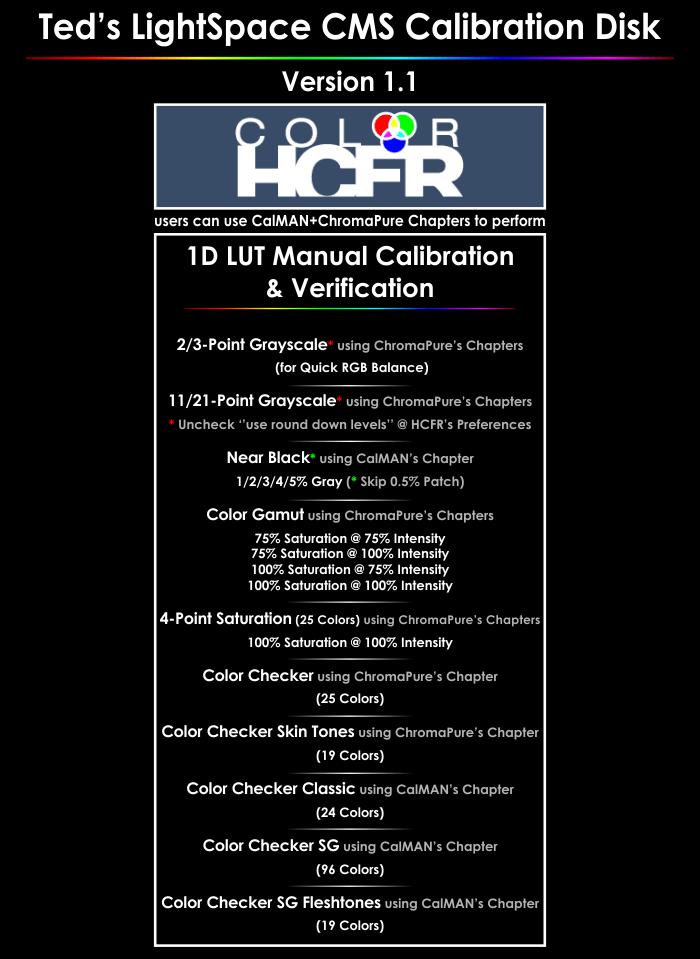
Below you can find the updated list of the total CalMAN and ChromaPure Chapters that any HCFR user can use to take measurements. These Disk Chapters are accurate and match the HCFR's Color Engine Calculations.

HCFR_Support.png


Instructions for x-Point Grayscale Chapters Measurements

Uncheck ''use round down levels" that is located to HCFR ‘’Preferences’’ -> ‘’General’’ Tab. This is affecting only Grayscale measurements.

Instructions for Color Checker Chapters Measurements

HCFR_Preferences.png


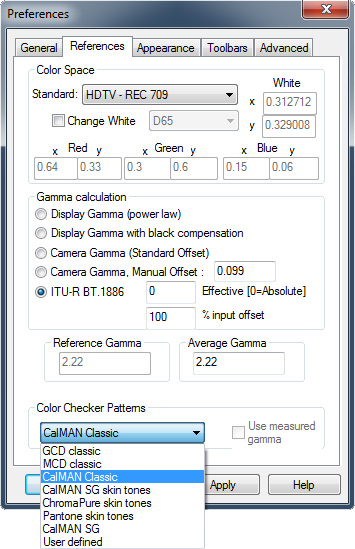
Before starting the measurements you have to select from HCFR's Preferences -> ''General'' Tab -> ''Color Checker Patterns'' drop down menu list the selection of the measurement run you want to perform.

Select ‘’GCD’’ if you want to measure using ChromaPure’s Color Checker Chapter.

Select ‘’ChromaPure skin tones’’ if you want to measure using ChromaPure’s Color Checker Skin Tones Chapter.

Select ‘’CalMAN Classic’’ if you want to measure using CalMAN’s Color Checker Classic Chapter.

Select ‘’CalMAN SG’’ if you want to measure using CalMAN’s Color Checker SG Chapter.

Select ‘’CalMAN SG skin tones’’ if you want to measure using CalMAN’s Color Checker SG Flesh Tones Chapter.

Note that there differences between the RGB Targets of CalMAN vs. ChromaPure ColorChecker & Skintones patterns.

Thanks Zoyd (current developer of HCFR) for adding these new features."
 
Ultima modifica:
Mi sono accorto solo oggi che il disco di Ted contiene una piccola (ma per me molto importante) caratteristica che consente di trovare con grande precisione il livello giusto del Brightness della propria catena video.
In passato spesso abbiamo avuto diversi punti di vista su quale fosse il migliore pattern in proposito: personalmente ritenevo finora l'Advanced Brightness del disco Wow Disney quello più utile e preciso.
Da oggi affianco al suddetto il pattern Advanced Brightness Flashing Bars (presente nel capitolo "Pre-Calibration Tools") del disco di Ted.
Questo pattern infatti, oltre a visualizzare le classiche barre per Bianco, Primari e Secondari, presenta un dettaglio (di cui mi sono accorto solo oggi) secondo me utilissimo. (Probabilmente molti di voi lo avevano già notato).
Se fate caso, lateralmente a sinistra è presente una scritta verticale "This is Reference Black & should be not visible" che non dovrebbe essere appunto visibile quando il Brightness è correttamente visualizzato.
In pratica consiglio di fare così: aumentate dapprima il Brightness per rendere la scritta visibile. Poi, click dopo click, riducete il Brightness fino a quando arrivate al livello in cui non è più visibile: quello è il giusto Brightness.
Semplicissimo e rapidissimo!

257kkm8.jpg
 
qui di seguito riporto la email dell'autore del disco Ted’s LightSpace CMS Calibration Disk che mi ha inviato al riguardo di HCFR:

"Dear disk users,

HCFR 3.2.0 (free open source calibration software) has been released and it's adding a lot of extra measurement options for Ted's LightSpace CMS Calibration Disk users. For full HCFR release notes look here.

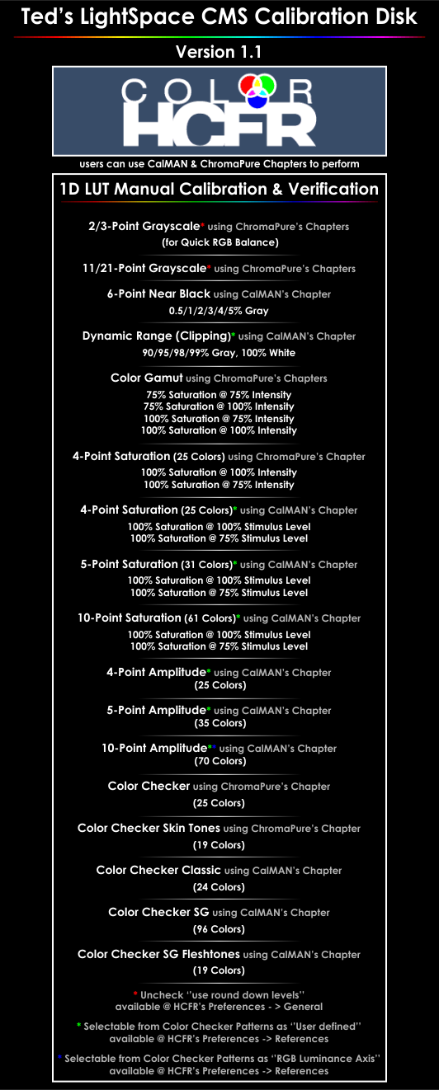
Using HCFR 3.2.0 with Ted's LightSpace CMS Calibration Disk you will be able to measure now all the CalMAN Session of the disk Chapters, here is the complete list of the supported chapters:

For Ted's LightSpace CMS Calibration Disk (Free Version) users:

CalMAN's Color Checker Classic (24 Colors)

For Ted's LightSpace CMS Calibration Disk (Full Version) users:

ChromaPure's 2/3-Point Grayscale
ChromaPure's 11/21-Point Grayscale
ChromaPure's Color Gamut (100% Saturation w/ 100% or 75% Intensity, 75% Saturation w/ 100% or 75% Intensity)
ChromaPure's 4-Point Saturation with 100% or 75% Intensity (25 Colors)
CalMAN's 4-Point Saturation with 100% or 75% Stimulus Level (25 Colors)
CalMAN's 5-Point Saturation with 100% or 75% Stimulus Level (31 Colors)
CalMAN's 10-Point Saturation with 100% or 75% Stimulus Level (61 Colors)
CalMAN's 4-Point Luminance (28 Colors)
CalMAN's 5-Point Luminance (35 Colors)
CalMAN's 10-Point Luminance (70 Colors)
6-Point Near Black (added support for 0.5% Gray patch measurement)
Dynamic Range Clipping (90/95/98/99%/100%)
CalMAN's Color Checker Classic (24 Colors)
CalMAN's Color Checker SG (96 Colors)
CalMAN's Color Checker SG Fleshtones (19 Colors)
ChromaPure's Color Checker (25 Colors)
ChromaPure's Color Checker Skin Tones (19 Colors)

HCFR 3.2.0 follows the same pattern order with Ted's LightSpace CMS Calibration Disk Chapters for any of the above measurement options and the HCFR's 8-bit RGB Triplets for each pattern are matching exactly the RGB Triplets that the Ted's LightSpace CMS Calibration disk has been encoded.

Below you can find the updated list of the total CalMAN and ChromaPure Chapters that any HCFR user can use to take measurements. These Disk Chapters are accurate and match the HCFR's Color Engine Calculations:

HCFR_3-2-0_Support.png


Instructions for x-Point Grayscale ChromaPure's Chapters Measurements

Uncheck ''use round down levels" that is located to HCFR ''Preferences'' -> ''General'' Tab. This is affecting only Grayscale measurements.

Instructions for Color Checker Chapters Measurements

HCFR_Preferences.png


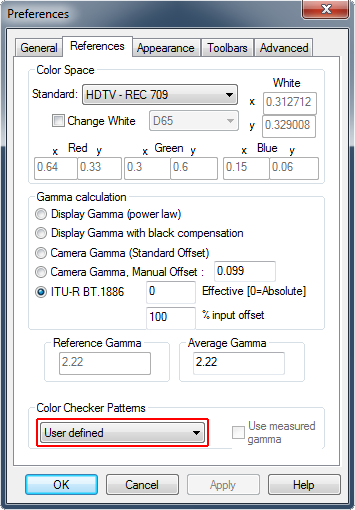
Before starting the measurements you have to select from HCFR's Preferences -> ''References'' Tab -> ''Color Checker Patterns'' drop down menu list the selection of the measurement run you want to perform.

Select ''GCD'' if you want to measure using ChromaPure's Color Checker Chapter.

Select ''ChromaPure skin tones'' if you want to measure using ChromaPure's Color Checker Skin Tones Chapter.

Select ''CalMAN Classic'' if you want to measure using CalMAN's Color Checker Classic Chapter.

Select ''CalMAN SG'' if you want to measure using CalMAN's Color Checker SG Chapter.

Select ''CalMAN SG skin tones'' if you want to measure using CalMAN's Color Checker SG Flesh Tones Chapter.

Instructions for CalMAN's x-Point Saturation/Luminance Chapters Measurements

To enable these measurements the users have to download the usercolors_pak.zip of HCFR.

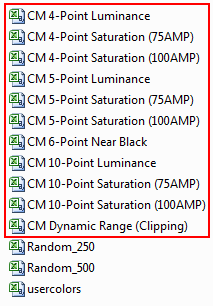
By extracting the files of the HCFR's usercolor_pak, below are the Ted's LightSpace CMS Calibration Disk Pattern Sequences of the CalMAN's Session you can use with HCFR 3.2.0:

HCFR_Teds_Disk_Sequences.png


CM 4-Point Saturation (100AMP).cvs file for CalMAN's 4-Point Saturation (100% Stimulus Level) Chapter.

CM 4-Point Saturation (75AMP).cvs file for CalMAN's 4-Point Saturation (75% Stimulus Level) Chapter.

CM 5-Point Saturation (100AMP).cvs file for CalMAN's 5-Point Saturation (100% Stimulus Level) Chapter.

CM 5-Point Saturation (75AMP).cvs file for CalMAN's 5-Point Saturation (75% Stimulus Level) Chapter.

CM 10-Point Saturation (100AMP).cvs file for CalMAN's 10-Point Saturation (100% Stimulus Level) Chapter.

CM 10-Point Saturation (75AMP).cvs file for CalMAN's 10-Point Saturation (75% Stimulus Level) Chapter.

CM 6-Point Near Black.cvs file for CalMAN's 6-Point Near Black Chapter.

CM Dynamic Range (Clipping).cvs file for CalMAN's Dynamic Range (Clipping) Chapter.

CM 4-Point Luminance.cvs file for CalMAN's 4-Point Luminance Chapter.

CM 5-Point Luminance.cvs file for CalMAN's 5-Point Luminance Chapter.

CM 10-Point Luminance.cvs file for CalMAN's 10-Point Luminance Chapter.

Note: The pattern sequence of CalMAN's 10-Point Luminance is identical to the Color Checker Selection ''RGB Luminance Axis'', so it can be selected from the drop-down menu available @ HCFR's Preferences -> ''References'' Tab.

These new measurement selections currently are now available to the HCFR's Color Checker Pattern drop down menu. To enable any of the measurement option the user has to rename the CMxxxxxxx.cvs measurement file want to perform to usercolors.csv and place it to the same folder where the HCFR has installed (where the HCFR's executable is located), and select from the HCFR's Color Checker Pattern list the ''User defined'' option.

HCFR_User_defined.png


This can be performed while the HCFR is running, for example to do one measurement run; and then replace the CVS file to load the new colors set... and hit the delete icon next to the grid.

For being more user friendly, If there much interest from the HCFR users that using Ted's LightSpace CMS Calibration disk; then these measurement options will be probably selectable from the Color Checker's drop down list in a future release of HCFR. You can request this from Zoyd, the current developer of HCFR to this thread.

Note that there differences between the RGB Targets of CalMAN vs. ChromaPure ColorChecker & Skintones or Saturation patterns.

Thanks Zoyd (current developer of HCFR) for adding these new measurement options for Ted's LightSpace CMS users of HCFR."
 
Ultima modifica:
Top